Osamason: Custom Shopify Theme for an Artist Merch Store
A dark, editorial Shopify storefront with instant quick view and safe pre-orders, built for drop-day traffic.
Osamason's official merch store needed a storefront that looked like the artist and handled drop-day traffic on mobile. I built a custom Shopify theme on the Horizon architecture, with a fixed sidebar, an instant zoom-from-card quick view, pre-order integration and theme-editor controls the team can use without a developer.
Client
Osamason
Osamason
Role
Lead Shopify Developer
Year
2026
Category
Ecommerce · Shopify Development
The challenge#
Artist merch is a different kind of ecommerce. Traffic arrives in spikes when a drop, tour or album goes live, most visitors are on their phones, and many buy on impulse. The store also has to look like the artist, not like a generic shop.
Osamason's official merch store needed a storefront that:
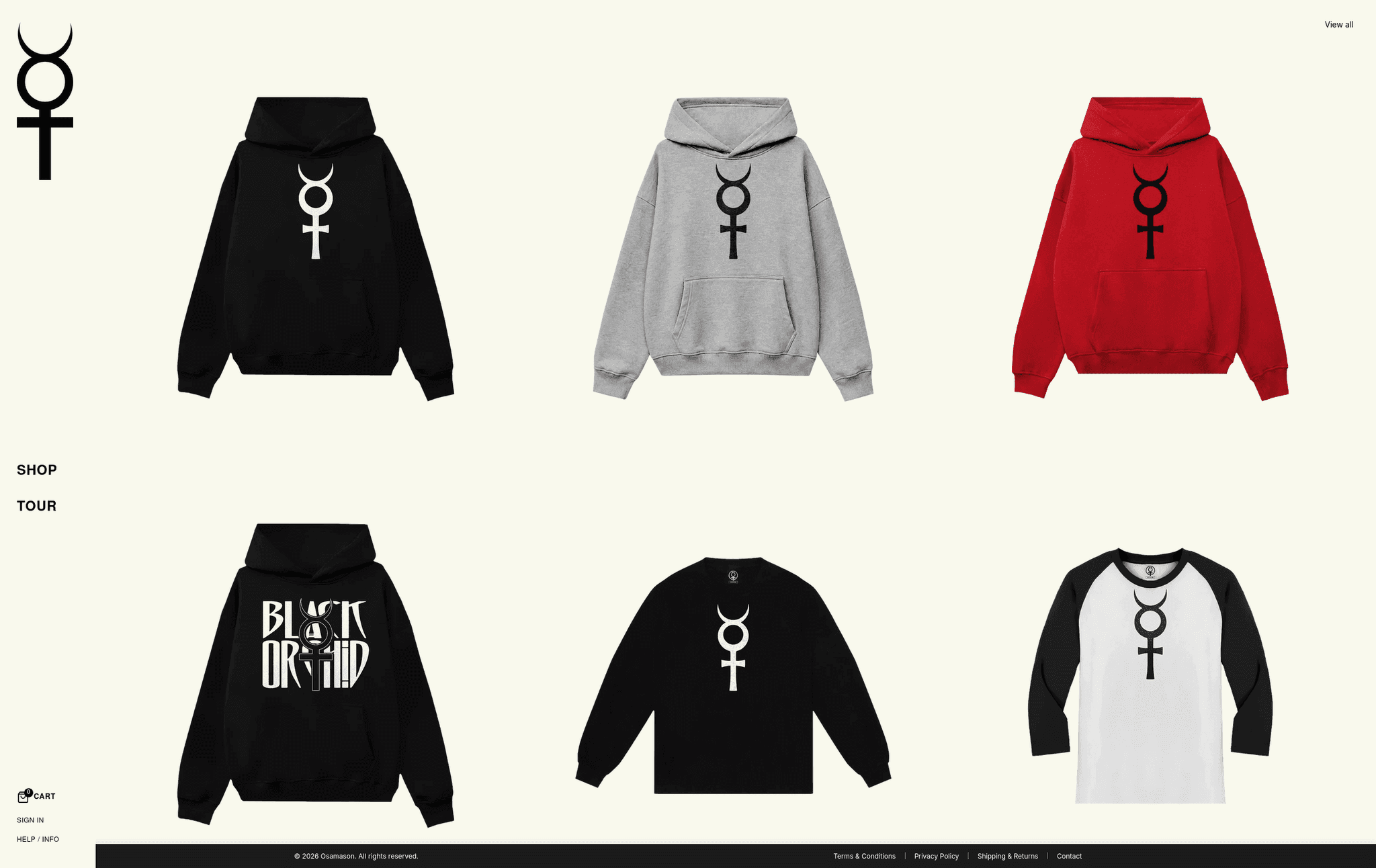
- Matched a dark, minimalist, editorial brand. The reference was high-fashion streetwear: no clutter, no price tags on grids, no boxy badges, and plenty of space around each product.
- Let fans buy fast. A visitor who clicks a product from a drop should not wait for a full page load, then go back and lose their place in the grid.
- Handled pre-orders cleanly. Merch often ships after the drop, so the buy button had to switch to "Pre-order" automatically for the right products.
- Worked as well on mobile as on desktop, because mobile is where most of the traffic comes from.
- Stayed editable. The team needed to change colors, copy and layout themselves from the Shopify theme editor.
An off-the-shelf theme could not do this without fighting its own defaults, so a custom build was the right call.
The approach#
I started from Shopify's current Horizon theme architecture, which gives a solid, performant and accessible base, and built the brand experience on top as custom, self-contained theme blocks. Every block is configurable in the theme editor, so the client keeps full control.
This avoids two common traps: the slow "page builder plus ten apps" store, and the fully custom theme that only its original developer can touch. I also chose native browser features (custom elements, CSS transitions, the AJAX Cart API) over extra libraries, which keeps the front end lean.
What I built#
Fixed sidebar navigation and an app-style mobile header#
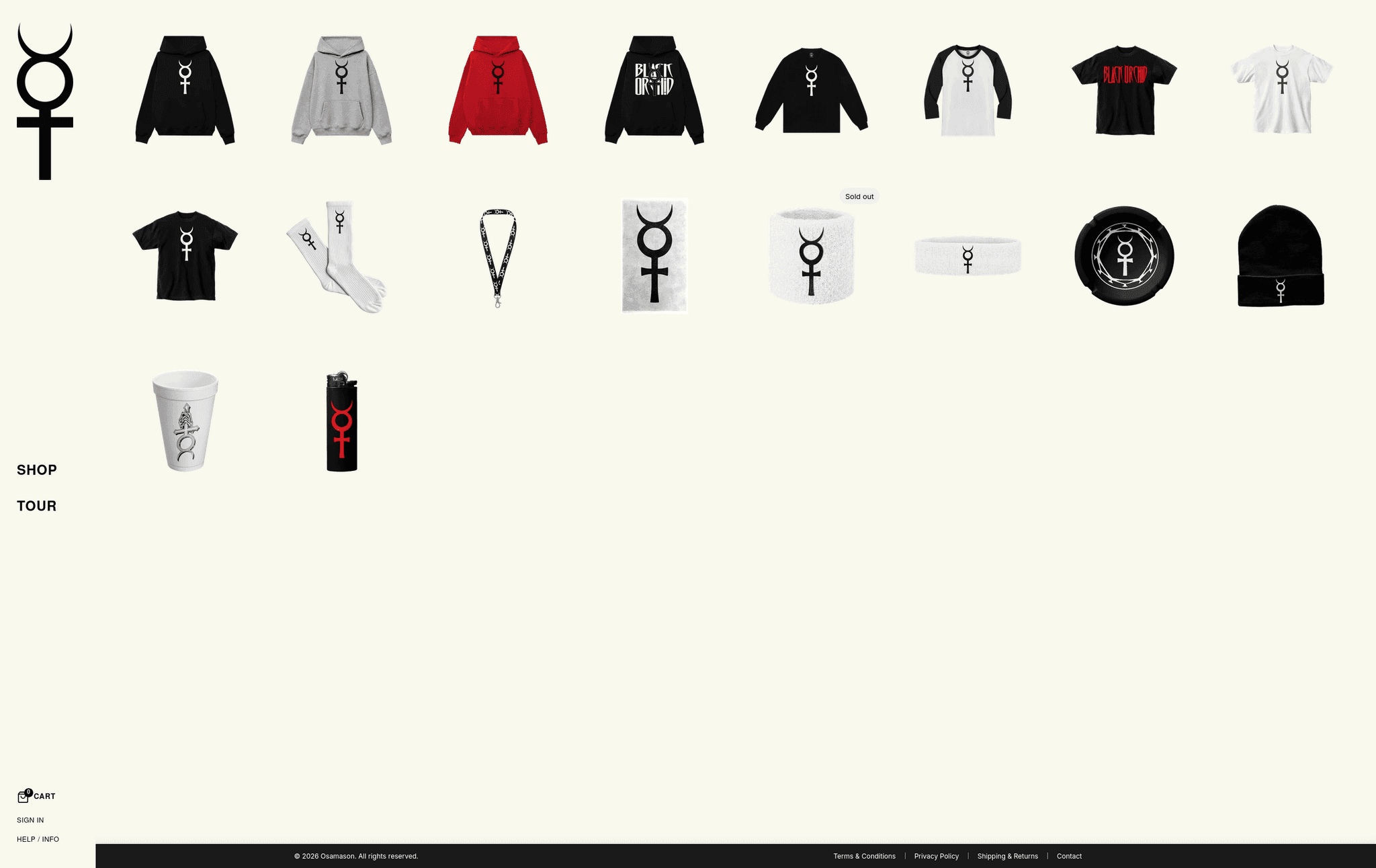
On desktop (990px and up), the navigation is a fixed vertical sidebar on the left, with the logo at the top and bold uppercase links stacked below. Its background follows the theme's body color, so it never clashes if the palette changes, and links get a thin line accent on hover.
On mobile it becomes a compact 56px header with a minimal "+" menu icon on the left, the centered logo and a shopping bag icon on the right. The "+" opens a slide-out drawer with an opaque background, a smooth animation and the same links.
- Accessible by default: labeled landmarks,
aria-expandedandaria-controlson the toggle,aria-hiddenmanagement on the drawer, and Escape to close. - The mobile header is pinned and page content is offset to match, on every template including the cart page, so the header never covers buttons.
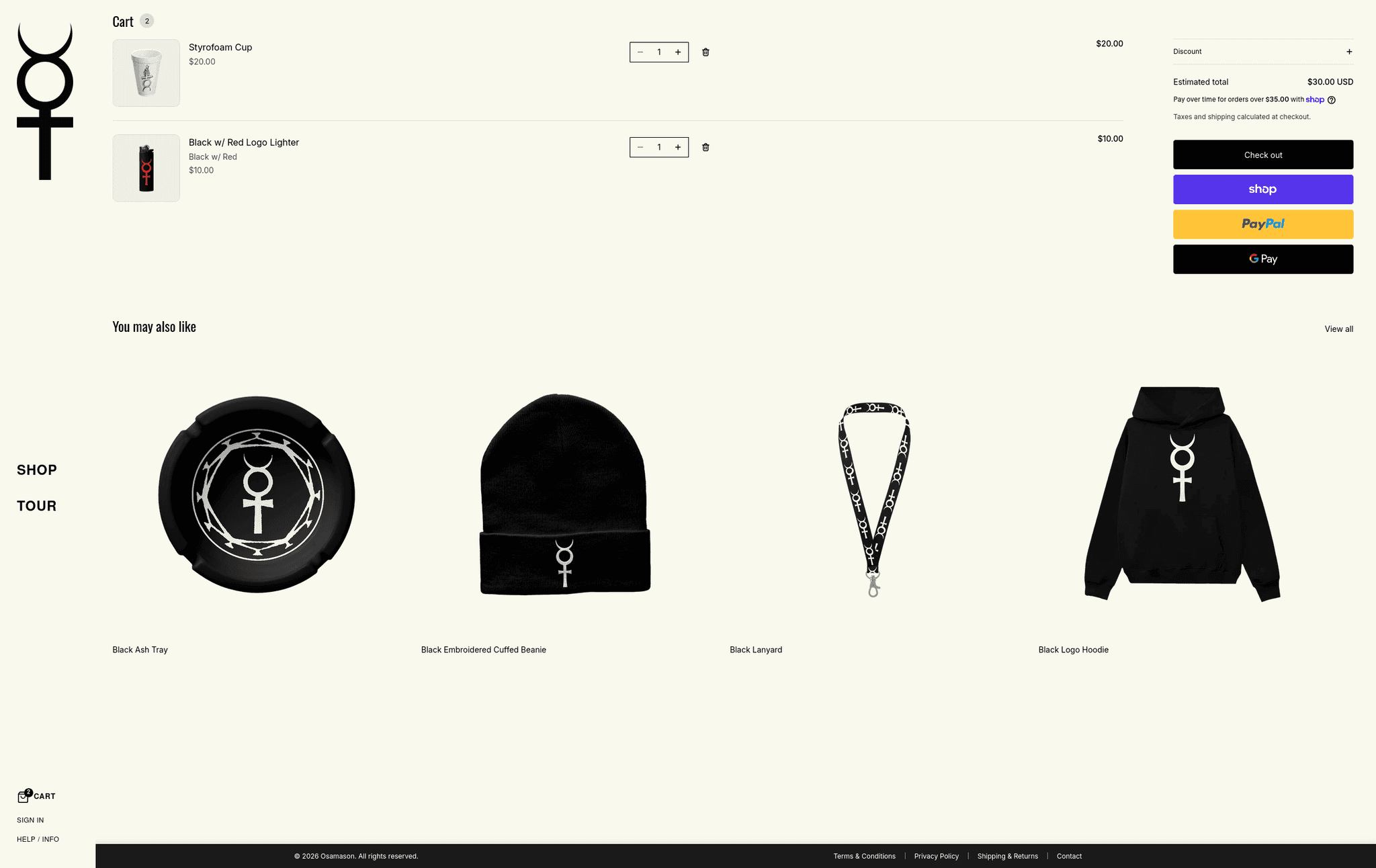
- A live cart badge sits in both the sidebar and the mobile header.
Instant product quick view with a card-to-fullscreen zoom#
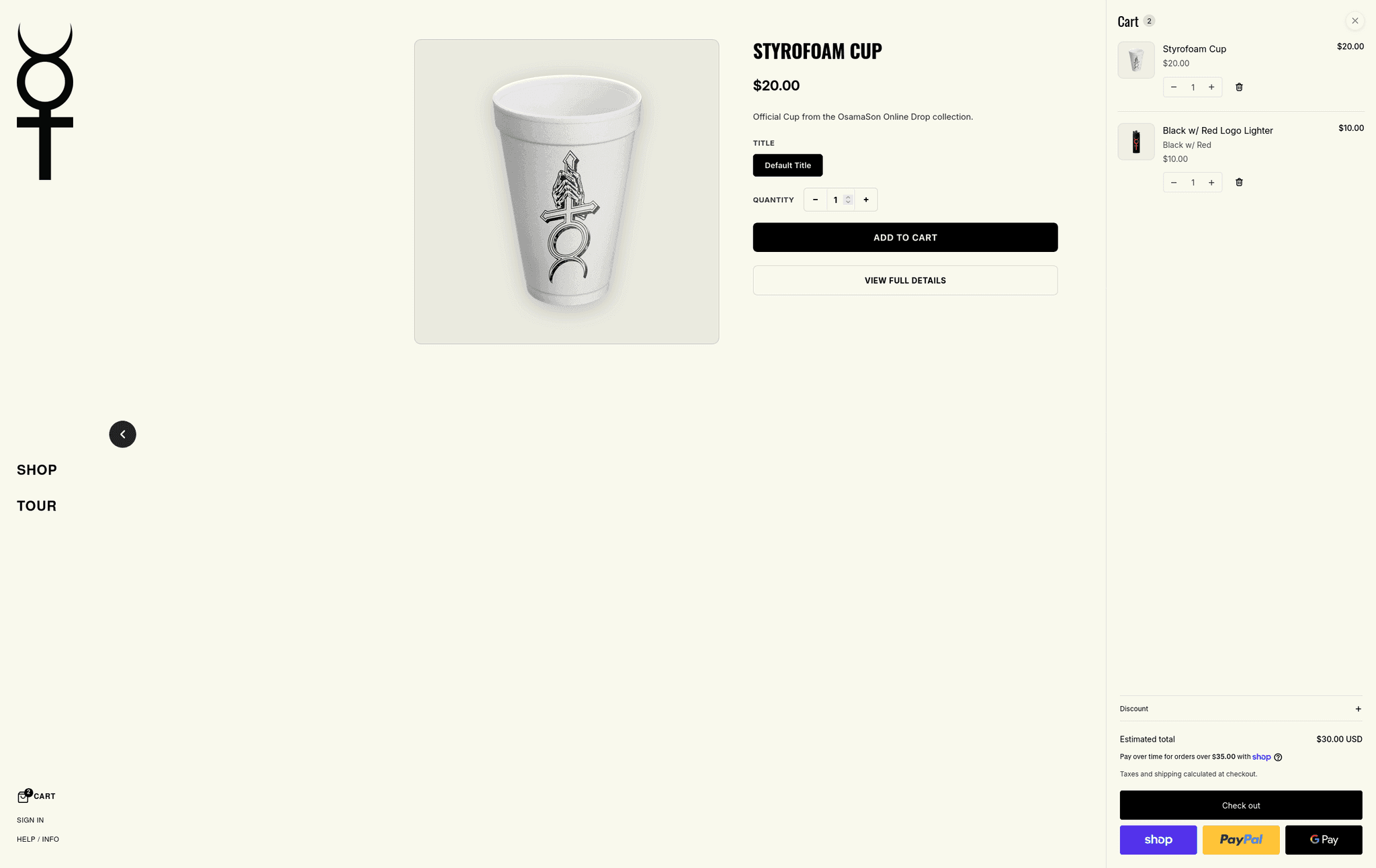
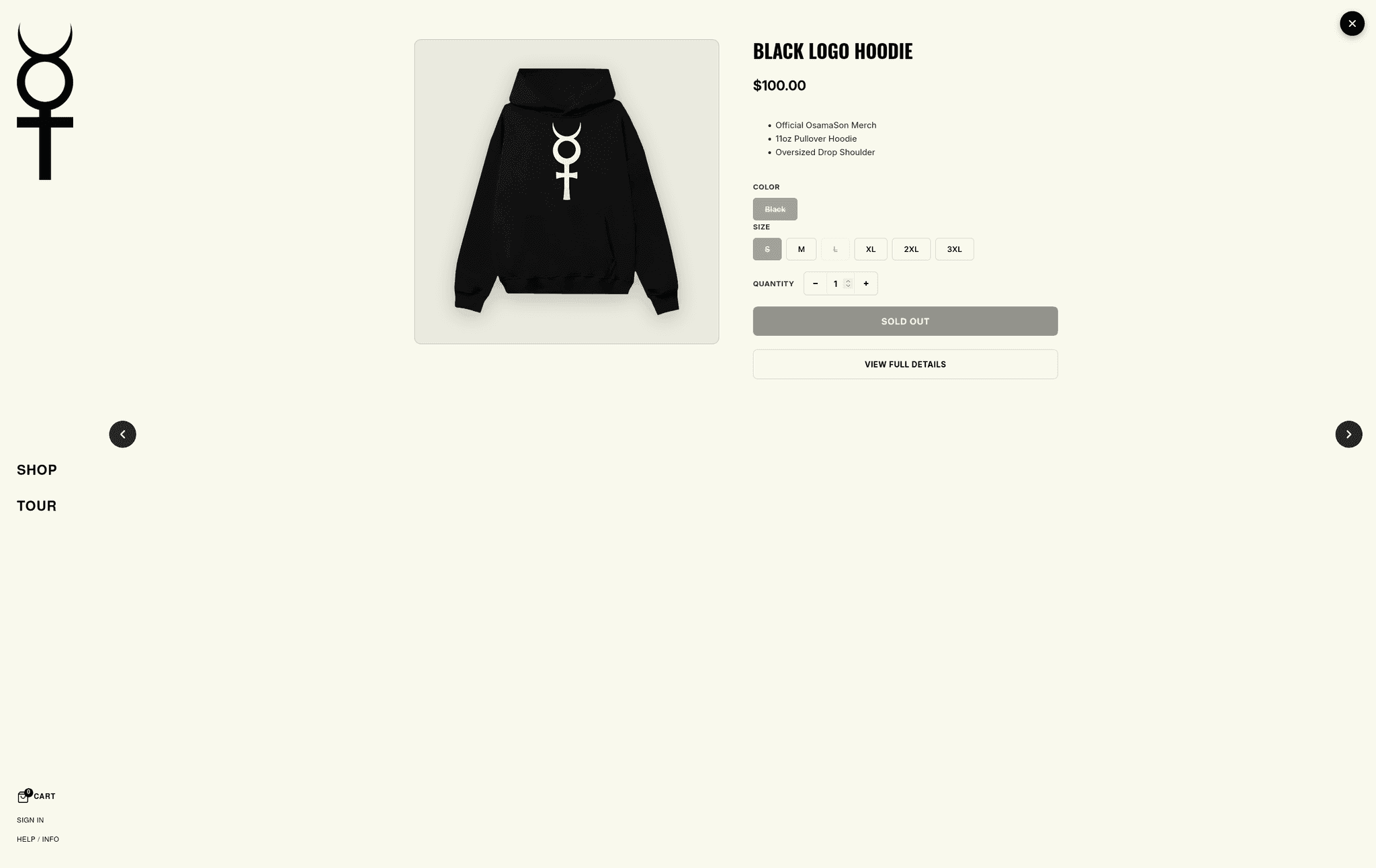
This is the centerpiece. Clicking any product card on the homepage, a collection or search results opens a full-screen quick view instead of navigating away.
- Origin-based animation. The modal grows out of the exact card that was clicked, using that card's on-screen position as the transform origin, and shrinks back into it on close (350-500ms, custom cubic-bezier easing). The visitor never loses their place.
- One global component. It is a single custom element rendered once in the main layout that intercepts product-card clicks across the whole store, so new sections and pages get quick view automatically.
- Browse without closing. Previous and next arrows move through the products in the current grid, so a fan can flick through an entire drop in one session.
- Everything needed to buy: image gallery with thumbnails, title, price, variant selectors, quantity stepper, description, add to cart and a link to the full product page.
- Sidebar aware. On desktop the modal sits beside the fixed navigation instead of covering it.
- Cart sync. Adding to cart uses Shopify's AJAX Cart API and fires the theme's cart events, so the cart drawer and badges update instantly with no page reload.
- Keyboard friendly. Close button, backdrop click, Escape key and labeled controls.
Pre-orders through app integration#
Many merch drops sell before stock exists. The quick view integrates with the EZ PreOrder app through Shopify's app proxy:
- When a product opens, the theme checks whether it is a pre-order product and whether the selected variant qualifies.
- If it does, the button changes from "Add to cart" to the configured pre-order label, and the correct pre-order line item properties are sent with the cart request.
- Results are cached per product, so reopening a product is instant.
- Request tokens prevent race conditions: if a fan flips quickly through products, a slow response for an earlier product can never overwrite the button state of the current one.
- Safe failure states: the button shows "Loading..." while the check runs and "Please try again" if it fails, so a pre-order item can never be added as a regular purchase by accident.
This is the kind of detail that prevents refunds and support tickets after a drop.
Editorial product grid with a density toggle#
- Strict 1:1 square tiles with each product image centered and contained, so cutout images of different sizes line up cleanly.
- Uppercase, centered titles with equal reserved height, so rows stay aligned even when names wrap.
- Prices and boxy badges hidden on grid cards for the minimalist look. Price appears in the quick view, where it matters.
- Three columns on mobile by default, with a toggle to a single-column view.
- On desktop, visitors can switch between the default grid and a zoomed-out dense grid, and the choice is remembered for the session.
Live cart icon and count#
A cart icon with an item-count badge that updates the moment something is added. It starts from the server-rendered cart count and stays in sync through the AJAX Cart API (/cart.js) and cart events. The same logic is reused in the sidebar and the mobile header.
Email signup banner and sticky legal footer#
- "Exclusive drop for the cult" banner: a full-width, high-contrast, dark purple banner with large dramatic type and an inline email field, built for list growth ahead of drops.
- Sticky footer bar: a slim fixed bar with the legal and support links (Terms, Privacy, Shipping & Returns, Privacy Choices, Contact) and copyright, which keeps compliance one glance away without cluttering the page. It stacks cleanly on mobile.
Built for the client to own#
- Theme editor controls on every custom block. Colors, spacing, sizes, text and animation durations are all settings, so routine changes need no code.
- Scoped styling. Each block generates its own unique ID for its CSS, so multiple copies of a block, or future blocks, can never collide.
- Native Shopify architecture. Online Store 2.0 JSON templates, sections and blocks let the client rearrange pages in the editor.
- Global settings respected. The brand palette lives in theme settings and flows into the custom components.
- Multilingual ready. The base theme ships with translations for around 50 languages.
Results#
The store at store.osamason.com is live as a distinctive, minimalist storefront with an app-like shopping flow that the team can edit without a developer. The build delivers:
- Fewer steps to purchase. Fans browse, preview and add to cart without leaving the grid.
- No lost place in the catalog. The zoom animation and previous/next arrows keep fans in flow.
- A brand-true store. The design language matches the artist's identity instead of a template's.
- Safe pre-orders. The right button state and line item data, even under rapid browsing.
- Lean front end. Custom code instead of stacking apps for the sidebar, quick view, cart badge and signup banner, which means fewer third-party scripts.
Is a custom theme right for your store?#
A custom Shopify theme is worth it when your brand needs to look unlike every other store on the platform, when you run drops or limited releases where speed and flow decide sales, and when you want app-like interactions without a pile of apps. If that sounds like your store, see my ecommerce development services or get in touch.
Gallery
Tech stack
 Shopify Online Store 2.0
 LiquidHorizon theme
 JavaScript
 Web Components
 CSSShopify AJAX Cart APIShopify App ProxyEZ PreOrder
Timeline & Milestones
Brand and architecture
Studied the editorial streetwear reference and chose Shopify's Horizon architecture as the base for custom blocks.
Navigation and grid
Built the fixed sidebar, the app-style mobile header and the square-tile product grid with its density toggle.
Quick view and cart
Built the global quick view with its card-to-fullscreen animation and the live cart badge.
Pre-orders and polish
Integrated EZ PreOrder through the app proxy, then added the signup banner, legal footer and theme editor controls.
Outcomes & Impact
- 10
Custom theme blocks
Result description
 ~8,500
Lines of custom Liquid, CSS and JS
Result description
- ~50
Languages supported by the base theme
Result description
- 1
Global quick-view component
Result description